

How to Use the SproutOS Guided Brief for Client Project Scoping
SproutOS Guided Brief: a 6-step discovery wizard that captures goals, brand, and references so the AI generates a tailored sitemap and design.
The Guided Brief is a 6-step discovery wizard in SproutOS that captures everything about your client's project before any design begins. You answer questions about the business, audience, brand, and references. SproutOS uses your answers to generate a tailored sitemap and design. The more detail you provide, the more accurate the output.
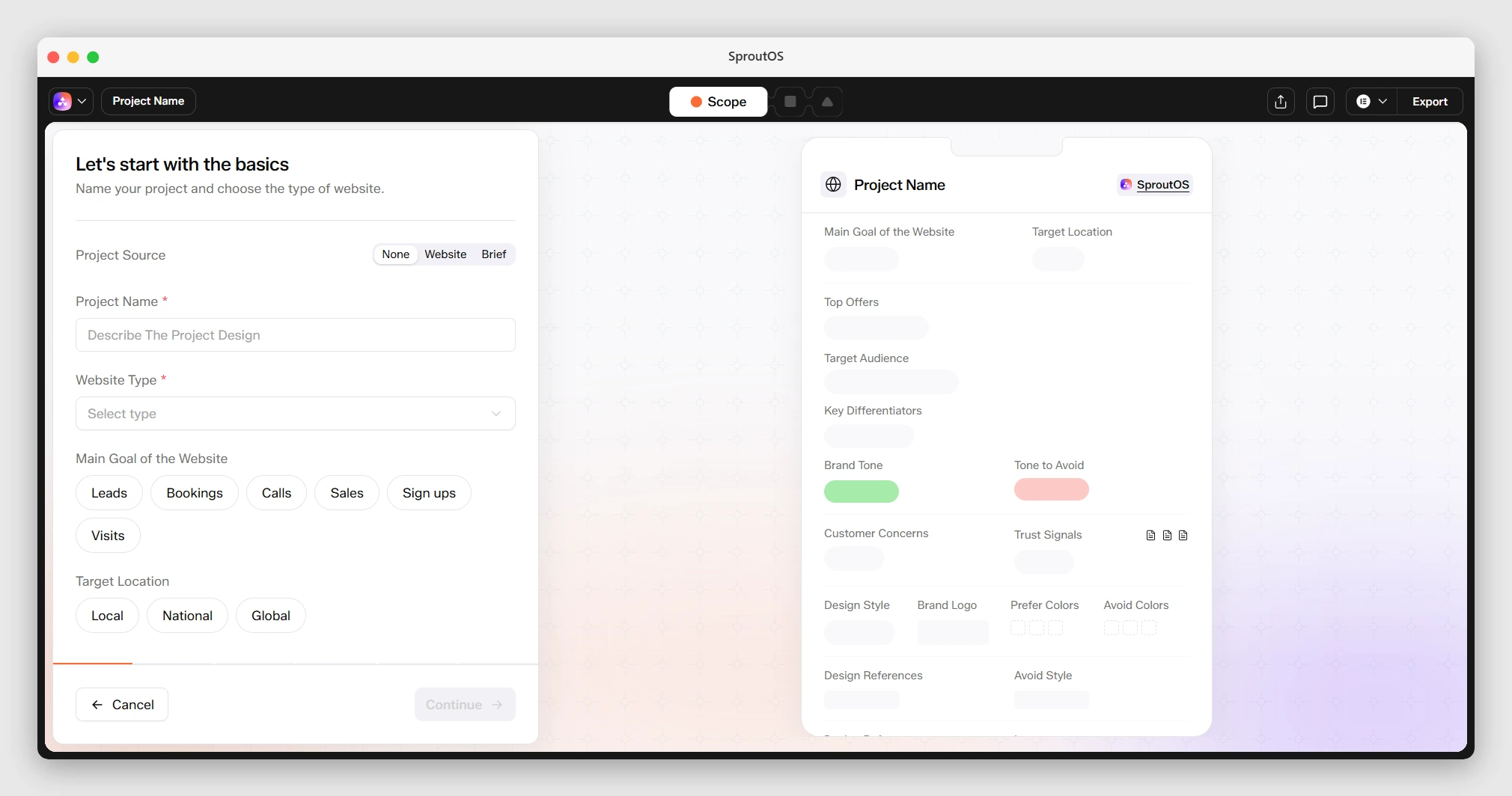
Phase 1 of 4. You are here: Brief, then Sitemap, Design, Export. What you enter in the Guided Brief shapes everything SproutOS generates after this.
Best Used For
- Freelance web designers running discovery calls and need a structured way to capture everything before starting design
- WordPress agencies building pre-sales mockups and want a shareable brief the client can sign off on before scope is locked
- Internal teams handing off a project to a junior designer or contractor who needs full context without a 30-minute call
What You Get From the Guided Brief
- Tailored sitemap. The AI uses your business description, audience, and goals to generate a page structure matched to the project, not a generic template.
- Brand-matched design. Tone, brand style, colors, and typography preferences flow into the first design pass, so the output reflects the client before any manual editing.
- URL-crawled reference data. Pasted reference sites are crawled automatically for colors, fonts, navigation, and tone, so you do not need to document style inspiration by hand.
- Shareable client brief. The completed brief is itself a deliverable you can share with the client for sign-off before any design work begins.
Before You Start
- A project created from the dashboard
- Basic information about the client's business, goals, and brand
How to Complete the 6 Steps of the Guided Brief
Project Basics
Enter the project name, website type, and primary goals. This is the foundation SproutOS uses to decide what pages to generate. A SaaS project gets a pricing page by default; a portfolio does not.
- Website type: Business, E-Commerce, Portfolio, Blog, Digital Agency, SaaS
- Primary goals: Leads, Bookings, Calls, Sales, Sign-ups, Visits
- Target locations: Local, National, Global
If the client has an existing website, paste the URL here. SproutOS crawls it and extracts brand insights automatically, which is the single fastest way to get an accurate first pass for a rebrand or redesign project.
Business Snapshot
Describe the business so SproutOS understands what it offers and who it serves. This is where the copy voice is set: tone selections here flow directly into headline and body copy in the generated pages.
- Top offers and value propositions
- Primary customer description
- Unique differentiators
- Preferred tone: Premium, Friendly, Bold, Minimal, Playful, Corporate. Pick Premium for law firms, financial services, or high-ticket B2B. Pick Friendly for coaching, wellness, and local services. Pick Bold for agencies and SaaS. Pick Playful for kids, food, and lifestyle brands. Pick Corporate for enterprise or compliance-heavy industries.
- Tones to avoid. Use this to steer the AI away from a voice that does not fit the client, for example marking "Playful" as avoid for a law firm.
Copy and Trust Building
Add proof elements that build trust with website visitors. The AI weaves these directly into hero, about, and CTA sections. Scoping a service business with no testimonials yet? Leave this step blank and the AI uses generic trust cues instead.
- Customer objections or hesitations to address
- Available proof: Testimonials, Case Studies, Results, Certifications
- Supporting documents or links
Brand Direction
Define the visual identity of the project. This is where tone meets design: what you pick here sets color palette, typography pairing, and section layout density in the first design pass.
- Brand style: Minimal, Premium, Playful, Bold, Corporate, Elegant, Techy, Organic. Use Minimal or Elegant when the client wants white space and restraint. Use Bold or Techy for SaaS, dev tools, and growth-stage startups. Use Organic for wellness, food, or sustainability brands. Use Corporate when the client has existing brand guidelines that lean conservative.
- Logo upload
- Preferred colors (hex input)
- Colors to avoid
- Typography preferences
References
Add websites the client likes and dislikes. SproutOS crawls each URL and extracts colors, fonts, navigation structure, and content tone automatically. Use this step to shortcut a full mood-board call: three liked URLs from the client usually gives the AI enough signal to match taste on the first pass.
- Liked sites: URL and what you like about it (colors, layout, typography, feel)
- Disliked sites: what to avoid and why
Improve Accuracy
Add final context to sharpen the AI output. Use this step when the client has explicitly asked for a section that is not standard (for example, a "press" section or an interactive calculator), or when you want to compare against a specific competitor.
- Competitor URLs
- Preferred sections to include in the website
What SproutOS Does With Your Brief
Once you complete the brief, SproutOS analyzes everything you entered and generates a full sitemap. The AI uses your business description, brand direction, tone preferences, and reference sites to build a page structure matched to the project.
You can always edit the sitemap after it is generated. The brief sets the starting point. Nothing is locked in.
URL Crawling
When you paste a website URL anywhere in the brief, SproutOS crawls it automatically and extracts:
- Color palette
- Typography (heading and body fonts)
- Navigation structure
- Contact information and social links
- Testimonials and CTAs
- Brand tone and style
This works for the client's existing site, reference sites they like, and competitor URLs.
Frequently Asked Questions
Related Docs



Last updated 3 days ago
Built with Documentation.AI